はじめに#
この記事では、CloudFrontのアクセスログをAthenaでSQL分析できる環境を構築します。 サーバーレスでインフラ管理不要、S3のログファイルを直接クエリできるため、個人ブログのログ分析に最適です。
この記事で構築するもの#
- CloudFrontログの出力設定(S3バケット)
- Athenaクエリ環境(Workgroup、Glue Database/Table)
- サンプルクエリ(人気ページ、キャッシュヒット率、エッジロケーション分析)
想定する読者#
- 前回までの記事でS3 + CloudFront + 監視環境を構築済みの方
- CloudFrontのアクセスログを分析したい方
- SQLでログ分析したい方
完成イメージ#
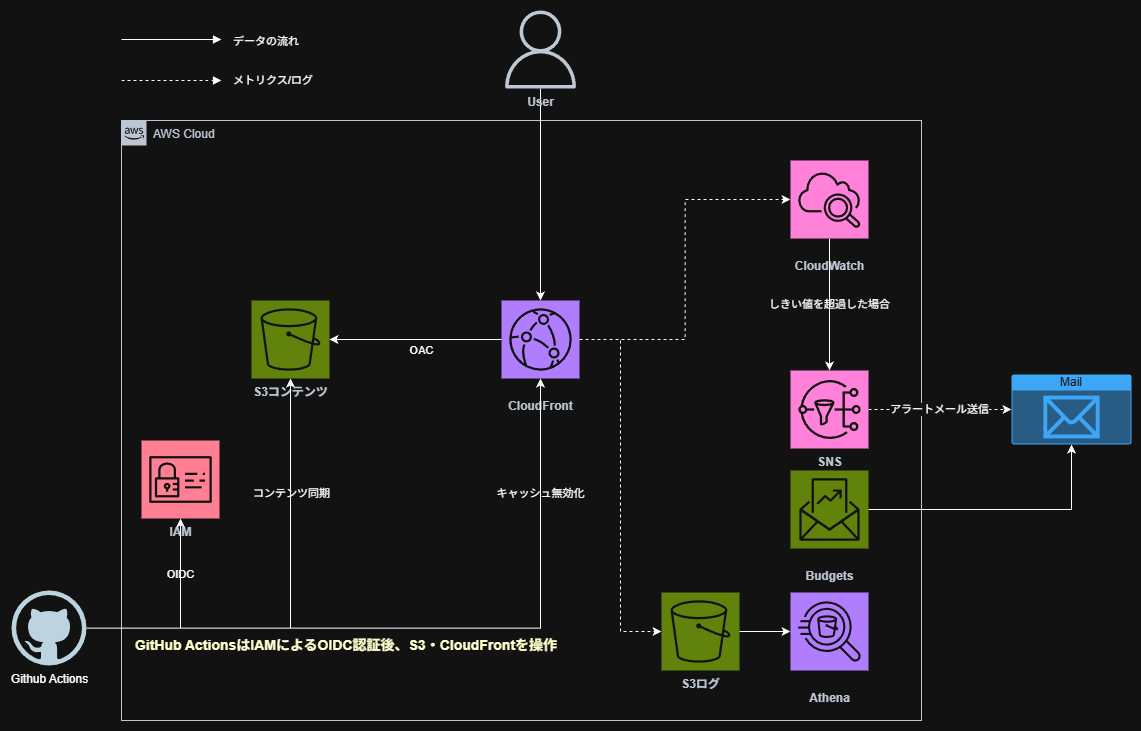
AthenaでSQLクエリを実行するだけで、以下のような分析ができるようになります。
- 人気ページランキング
- キャッシュヒット率
- エッジロケーション別アクセス数
- エラー発生状況
シリーズ全体像#
【Hugo×AWS】シリーズ全体で5記事投稿予定です。今回の記事は4本目です。
| # | タイトル | 内容 |
|---|---|---|
| 1 | Hugo + S3 + CloudFrontで技術ブログを公開する | Hugo環境構築〜手動デプロイまで |
| 2 | GitHub Actions + OIDCで自動デプロイ | CI/CD構築、アクセスキー不要の認証 |
| 3 | CloudWatch + SNSで監視・アラート通知 | ダッシュボード、エラー率アラーム |
| 4 | Athenaでアクセスログを分析する | CloudFrontログのSQL分析 |
| 5 | 独自ドメインを設定する(Route53 + ACM) | カスタムドメイン、HTTPS |
なぜAthenaを選んだのか#
ログ分析サービスの比較です。
| サービス | 特徴 | 月額コスト | 個人ブログに適切か |
|---|---|---|---|
| Athena | サーバーレス、S3直接クエリ | 数円〜数十円 | ✅ 最適 |
| Redshift | 大規模データウェアハウス | 数万円〜 | ❌ 過剰 |
| Elasticsearch | 全文検索、リアルタイム分析 | 数千円〜 | ❌ 過剰 |
| CloudWatch Logs Insights | CloudWatchログ専用 | 従量課金 | △ 可能だが機能限定 |
Athenaのメリット#
- サーバーレス: インフラ管理不要、クエリ実行時のみ起動
- S3直接クエリ: データ移動不要、S3のログをそのまま分析可能
- コスト効率: スキャンしたデータ量に対して$5/TB(個人ブログなら月数円以下)
- 標準SQL: 特別な言語を覚える必要がない
前提条件#
必要な環境#
本記事は、これまでの記事で以下が構築済みであることを前提としています。
- CloudFront Distribution
- Terraformプロジェクト
必要な情報#
cd hugo-s3-demo-infra/prod
terraform output
cloudfront_distribution_id = "E2XXXXXXXXXX"
ログ用S3バケットの作成#
CloudFrontのアクセスログを保存するS3バケットを作成します。
ディレクトリ構成#
hugo-s3-demo-infra/
└── prod/
    ├── versions.tf
    ├── backend.tf
    ├── variables.tf
    ├── main.tf
    ├── iam.tf
    ├── sns.tf
    ├── cloudwatch.tf
    ├── budgets.tf
    ├── outputs.tf
    └── logs.tf      ← 新規作成
logs.tf#
# ===========================================
# ログ用S3バケット
# ===========================================
resource "aws_s3_bucket" "logs" {
  bucket = "${var.project_name}-logs-${random_id.suffix.hex}"

  tags = {
    Name = "${var.project_name}-logs"
  }
}

# パブリックアクセスブロック
resource "aws_s3_bucket_public_access_block" "logs" {
  bucket                  = aws_s3_bucket.logs.id
  block_public_acls       = true
  block_public_policy     = true
  ignore_public_acls      = true
  restrict_public_buckets = true
}

# CloudFrontからのログ書き込みを許可するバケットポリシー
resource "aws_s3_bucket_policy" "logs" {
  bucket = aws_s3_bucket.logs.id

  policy = jsonencode({
    Version = "2012-10-17"
    Statement = [
      {
        Sid    = "AllowCloudFrontLogs"
        Effect = "Allow"
        Principal = {
          Service = "cloudfront.amazonaws.com"
        }
        Action   = "s3:PutObject"
        Resource = "${aws_s3_bucket.logs.arn}/cloudfront/*"
        Condition = {
          StringEquals = {
            "AWS:SourceArn" = aws_cloudfront_distribution.main.arn
          }
        }
      }
    ]
  })
}

# ログのライフサイクル設定(90日で削除)
resource "aws_s3_bucket_lifecycle_configuration" "logs" {
  bucket = aws_s3_bucket.logs.id

  rule {
    id     = "delete-old-logs"
    status = "Enabled"

    expiration {
      days = 90
    }

    filter {
      prefix = "cloudfront/"
    }
  }
}

# バケット所有者の強制(ACL無効化)
resource "aws_s3_bucket_ownership_controls" "logs" {
  bucket = aws_s3_bucket.logs.id

  rule {
    object_ownership = "BucketOwnerEnforced"
  }
}

output "logs_bucket_name" {
  value = aws_s3_bucket.logs.bucket
}
コード解説#
ライフサイクル設定#
resource "aws_s3_bucket_lifecycle_configuration" "logs" {
  rule {
    expiration {
      days = 90
    }
  }
}
90日経過したログファイルを自動削除します。 ログを永続保存するとコストがかかるため、個人ブログでは90日程度が適切です。
バケット所有者の強制#
resource "aws_s3_bucket_ownership_controls" "logs" {
  rule {
    object_ownership = "BucketOwnerEnforced"
  }
}
CloudFrontが書き込んだログファイルの所有権を、バケット所有者(自分)に強制します。 これにより、ACL(アクセスコントロールリスト)を使わずにバケットポリシーだけでアクセス制御できます。
CloudFrontのログ設定#
CloudFront Distributionにログ出力設定を追加します。
main.tf の修正#
aws_cloudfront_distribution リソースに logging_config を追加します。
resource "aws_cloudfront_distribution" "main" {
  # ...既存の設定...

  # ログ設定を追加
  logging_config {
    bucket          = aws_s3_bucket.logs.bucket_regional_domain_name
    prefix          = "cloudfront/"
    include_cookies = false
  }

  # ...既存の設定...
}
| 属性 | 説明 |
|---|---|
bucket | ログ出力先のS3バケット(リージョナルドメイン名を指定) |
prefix | ログファイルのプレフィックス |
include_cookies | Cookieをログに含めるか(プライバシーに配慮してfalse) |
実行#
terraform apply
:::message ログが出力されるまで数分〜数十分かかります。 しばらくアクセスしてから、S3バケットを確認してください。 :::
ログ出力の確認#
aws s3 ls s3://hugo-s3-demo-logs/cloudfront/ --recursive | head -10
以下のようなファイルが出力されていればOKです。
2025-12-04 09:49:29  673 cloudfront/E2XXXXXXXXXX.2025-12-04-00.29cc3bb9.gz
2025-12-04 13:49:30  580 cloudfront/E2XXXXXXXXXX.2025-12-04-04.74d28fa3.gz
Athena環境の構築#
athena.tf#
athena.tf を新規作成します。
:::details athena.tf の全体
# ===========================================
# Athenaクエリ結果用S3バケット
# ===========================================
resource "aws_s3_bucket" "athena_results" {
  bucket = "${var.project_name}-athena-results-${random_id.suffix.hex}"

  tags = {
    Name = "${var.project_name}-athena-results"
  }
}

resource "aws_s3_bucket_public_access_block" "athena_results" {
  bucket                  = aws_s3_bucket.athena_results.id
  block_public_acls       = true
  block_public_policy     = true
  ignore_public_acls      = true
  restrict_public_buckets = true
}

# クエリ結果は7日で削除
resource "aws_s3_bucket_lifecycle_configuration" "athena_results" {
  bucket = aws_s3_bucket.athena_results.id

  rule {
    id     = "delete-query-results"
    status = "Enabled"

    expiration {
      days = 7
    }

    filter {
      prefix = "query-results/"
    }
  }
}

# ===========================================
# Athena Workgroup
# ===========================================
resource "aws_athena_workgroup" "main" {
  name = "${var.project_name}-workgroup"

  configuration {
    enforce_workgroup_configuration    = true
    publish_cloudwatch_metrics_enabled = true

    result_configuration {
      output_location = "s3://${aws_s3_bucket.athena_results.bucket}/query-results/"
    }
  }

  tags = {
    Name = "${var.project_name}-workgroup"
  }
}

# ===========================================
# Glue Database
# ===========================================
resource "aws_glue_catalog_database" "logs" {
  name = replace("${var.project_name}_logs", "-", "_")
}

# ===========================================
# Glue Table(CloudFrontログ用)
# ===========================================
resource "aws_glue_catalog_table" "cloudfront_logs" {
  name          = "cloudfront_logs"
  database_name = aws_glue_catalog_database.logs.name

  table_type = "EXTERNAL_TABLE"

  parameters = {
    "skip.header.line.count" = "2"
    "EXTERNAL"               = "TRUE"
  }

  storage_descriptor {
    location      = "s3://${aws_s3_bucket.logs.bucket}/cloudfront/"
    input_format  = "org.apache.hadoop.mapred.TextInputFormat"
    output_format = "org.apache.hadoop.hive.ql.io.HiveIgnoreKeyTextOutputFormat"

    ser_de_info {
      serialization_library = "org.apache.hadoop.hive.serde2.lazy.LazySimpleSerDe"
      parameters = {
        "field.delim"            = "\t"
        "serialization.format"   = "\t"
      }
    }

    # CloudFrontログの33カラム定義
    columns {
      name = "date"
      type = "date"
    }
    columns {
      name = "time"
      type = "string"
    }
    columns {
      name = "x_edge_location"
      type = "string"
    }
    columns {
      name = "sc_bytes"
      type = "bigint"
    }
    columns {
      name = "c_ip"
      type = "string"
    }
    columns {
      name = "cs_method"
      type = "string"
    }
    columns {
      name = "cs_host"
      type = "string"
    }
    columns {
      name = "cs_uri_stem"
      type = "string"
    }
    columns {
      name = "sc_status"
      type = "int"
    }
    columns {
      name = "cs_referer"
      type = "string"
    }
    columns {
      name = "cs_user_agent"
      type = "string"
    }
    columns {
      name = "cs_uri_query"
      type = "string"
    }
    columns {
      name = "cs_cookie"
      type = "string"
    }
    columns {
      name = "x_edge_result_type"
      type = "string"
    }
    columns {
      name = "x_edge_request_id"
      type = "string"
    }
    columns {
      name = "x_host_header"
      type = "string"
    }
    columns {
      name = "cs_protocol"
      type = "string"
    }
    columns {
      name = "cs_bytes"
      type = "bigint"
    }
    columns {
      name = "time_taken"
      type = "float"
    }
    columns {
      name = "x_forwarded_for"
      type = "string"
    }
    columns {
      name = "ssl_protocol"
      type = "string"
    }
    columns {
      name = "ssl_cipher"
      type = "string"
    }
    columns {
      name = "x_edge_response_result_type"
      type = "string"
    }
    columns {
      name = "cs_protocol_version"
      type = "string"
    }
    columns {
      name = "fle_status"
      type = "string"
    }
    columns {
      name = "fle_encrypted_fields"
      type = "int"
    }
    columns {
      name = "c_port"
      type = "int"
    }
    columns {
      name = "time_to_first_byte"
      type = "float"
    }
    columns {
      name = "x_edge_detailed_result_type"
      type = "string"
    }
    columns {
      name = "sc_content_type"
      type = "string"
    }
    columns {
      name = "sc_content_len"
      type = "bigint"
    }
    columns {
      name = "sc_range_start"
      type = "bigint"
    }
    columns {
      name = "sc_range_end"
      type = "bigint"
    }
  }
}

# ===========================================
# Outputs
# ===========================================
output "athena_workgroup" {
  value = aws_athena_workgroup.main.name
}

output "athena_database" {
  value = aws_glue_catalog_database.logs.name
}

output "athena_table" {
  value = aws_glue_catalog_table.cloudfront_logs.name
}

output "athena_results_bucket" {
  value = aws_s3_bucket.athena_results.bucket
}
:::
コード解説#
Athena Workgroup#
resource "aws_athena_workgroup" "main" {
  configuration {
    enforce_workgroup_configuration    = true
    publish_cloudwatch_metrics_enabled = true

    result_configuration {
      output_location = "s3://${aws_s3_bucket.athena_results.bucket}/query-results/"
    }
  }
}
| 属性 | 説明 |
|---|---|
enforce_workgroup_configuration | Workgroupの設定を強制(ユーザーが上書きできない) |
publish_cloudwatch_metrics_enabled | クエリメトリクスをCloudWatchに出力 |
output_location | クエリ結果の保存先 |
Glue Data Catalogとは#
resource "aws_glue_catalog_database" "logs" {
  name = replace("${var.project_name}_logs", "-", "_")
}
Glue Data Catalogは、AWSのメタデータカタログサービスです。 Athenaはこれを参照してテーブル定義(スキーマ)を取得します。
Athena → Glue Data Catalog(テーブル定義)→ S3(実データ)
:::message
Glueのデータベース名にはハイフン - を使用できません。
replace() 関数でアンダースコア _ に置換しています。
:::
CloudFrontログのカラム定義#
CloudFrontの標準ログは33カラムのTSV(タブ区切り)形式です。 各カラムの意味はAWS公式ドキュメントを参照してください。
主要なカラムは以下の通りです。
| カラム名 | 説明 |
|---|---|
date, time | リクエスト日時 |
x_edge_location | エッジロケーション(NRT=東京など) |
cs_uri_stem | リクエストされたパス |
sc_status | HTTPステータスコード |
x_edge_result_type | キャッシュヒット/ミス |
実行#
terraform apply
分析クエリの実行#
AWSコンソールでAthenaを開き、クエリを実行します。
Workgroupの選択#
- Athenaコンソールを開く
- 右上の「Workgroup」で作成したWorkgroup(
hugo-s3-demo-workgroup)を選択 - 左側のデータベースで作成したデータベース(
hugo_s3_demo_logs)を選択
クエリ1: データ確認#
まずテーブルにデータが入っているか確認します。
SELECT * FROM hugo_s3_demo_logs.cloudfront_logs LIMIT 10;
33カラムのデータが表示されればOKです。
クエリ2: 人気ページランキング#
SELECT
  cs_uri_stem AS path,
  COUNT(*) AS views
FROM hugo_s3_demo_logs.cloudfront_logs
WHERE sc_status = 200
  AND cs_uri_stem NOT LIKE '%.js'
  AND cs_uri_stem NOT LIKE '%.css'
  AND cs_uri_stem NOT LIKE '%.png'
  AND cs_uri_stem NOT LIKE '%.jpg'
  AND cs_uri_stem NOT LIKE '%.ico'
GROUP BY cs_uri_stem
ORDER BY views DESC
LIMIT 10;
静的アセット(JS/CSS/画像)を除外して、ページのアクセス数をランキング表示します。
クエリ3: キャッシュヒット率#
SELECT
  x_edge_result_type AS result_type,
  COUNT(*) AS count,
  ROUND(COUNT(*) * 100.0 / SUM(COUNT(*)) OVER (), 2) AS percentage
FROM hugo_s3_demo_logs.cloudfront_logs
GROUP BY x_edge_result_type
ORDER BY count DESC;
| 結果タイプ | 意味 |
|---|---|
Hit | キャッシュヒット(エッジから配信) |
Miss | キャッシュミス(オリジンから取得) |
Error | エラー発生 |
Redirect | リダイレクト |
キャッシュヒット率が高いほど、CDNが効率的に動作しています。
クエリ4: エッジロケーション別アクセス#
SELECT
  x_edge_location AS edge,
  COUNT(*) AS requests
FROM hugo_s3_demo_logs.cloudfront_logs
GROUP BY x_edge_location
ORDER BY requests DESC
LIMIT 10;
どのエッジロケーションからのアクセスが多いかを確認できます。
| エッジコード | 場所 |
|---|---|
| NRT | 東京 |
| KIX | 大阪 |
| SEA | シアトル |
| SIN | シンガポール |
| FRA | フランクフルト |
クエリ5: 日別アクセス数#
SELECT
  date,
  COUNT(*) AS requests
FROM hugo_s3_demo_logs.cloudfront_logs
GROUP BY date
ORDER BY date DESC
LIMIT 30;
クエリ6: HTTPステータス別集計#
SELECT
  sc_status AS status,
  COUNT(*) AS count
FROM hugo_s3_demo_logs.cloudfront_logs
GROUP BY sc_status
ORDER BY count DESC;
4xx/5xxエラーが多い場合は、サイトに問題がある可能性があります。
コストについて#
Athenaの料金は、スキャンしたデータ量に対して**$5/TB**です。
個人ブログの場合#
| 項目 | 概算 |
|---|---|
| 1日のログサイズ | 約100KB〜1MB |
| 1ヶ月のログサイズ | 約3MB〜30MB |
| 1クエリあたりのコスト | 約$0.00001〜$0.0001 |
| 月間クエリコスト | 数円程度 |
個人ブログ規模であれば、月額数円〜数十円で収まります。
コスト最適化のポイント#
- 不要なカラムを除外:
SELECT *ではなく必要なカラムのみ指定 - WHERE句で絞り込み: 日付範囲を指定してスキャン量を削減
- パーティション: 大規模データの場合は日付でパーティション分割(本記事では省略)
トラブルシューティング#
クエリ結果が0件#
原因: ログがまだ出力されていない、またはテーブル定義が間違っている
確認ポイント:
- S3バケットにログファイルがあるか確認
- ログファイルのパスとGlue Tableの
locationが一致しているか確認 skip.header.line.countが2になっているか確認(CloudFrontログは2行のヘッダーがある)
HIVE_CURSOR_ERROR#
原因: カラム定義とログ形式の不一致
対処法: Glue Tableのカラム定義を確認し、CloudFrontログの形式と一致させる
クエリ結果の保存先が不明#
原因: Workgroupの設定が適用されていない
対処法: Athenaコンソールで正しいWorkgroupを選択しているか確認
まとめ#
本記事では、以下を構築しました。
- ログ用S3バケット: CloudFrontログの保存先(90日で自動削除)
- CloudFrontログ設定: アクセスログの出力
- Athena環境: Workgroup、Glue Database/Table
- 分析クエリ: 人気ページ、キャッシュヒット率、エッジロケーション分析
作成したリソース#
| リソース | 用途 |
|---|---|
| S3バケット(logs) | CloudFrontログ保存 |
| S3バケット(athena-results) | Athenaクエリ結果保存 |
| Athena Workgroup | クエリ実行環境 |
| Glue Database | メタデータカタログ |
| Glue Table | CloudFrontログのスキーマ定義 |
分析でわかること#
| 分析項目 | 活用例 |
|---|---|
| 人気ページ | コンテンツ戦略の参考 |
| キャッシュヒット率 | CDN設定の最適化 |
| エッジロケーション | ユーザーの地理的分布 |
| HTTPステータス | エラー発生状況の把握 |